A data platform is not production-ready simply because it produces the correct answer. It must produce the correct answer fast enough, reliably enough, and at a cost that the business can explain and sustain. In this chapter, you will build the engineering discipline behind those three constraints. You will translate a business requirement into a workload model, design a benchmark, compare baseline and optimized query behavior, and turn optimization work into a repeatable operating practice for TuranMart’s data platform.
Cost and performance are often discussed as separate topics, but in data engineering they are two sides of the same design problem. A query that scans ten times more data than necessary is slower, more expensive, and harder to scale. A streaming job that uses oversized workers may look reliable until the cloud bill arrives. A dashboard that refreshes every minute may delight users, but it can also burn compute on stale business questions. The goal is not to minimize cost blindly. The goal is to deliver the required business outcome with the least waste and the fewest hidden risks.
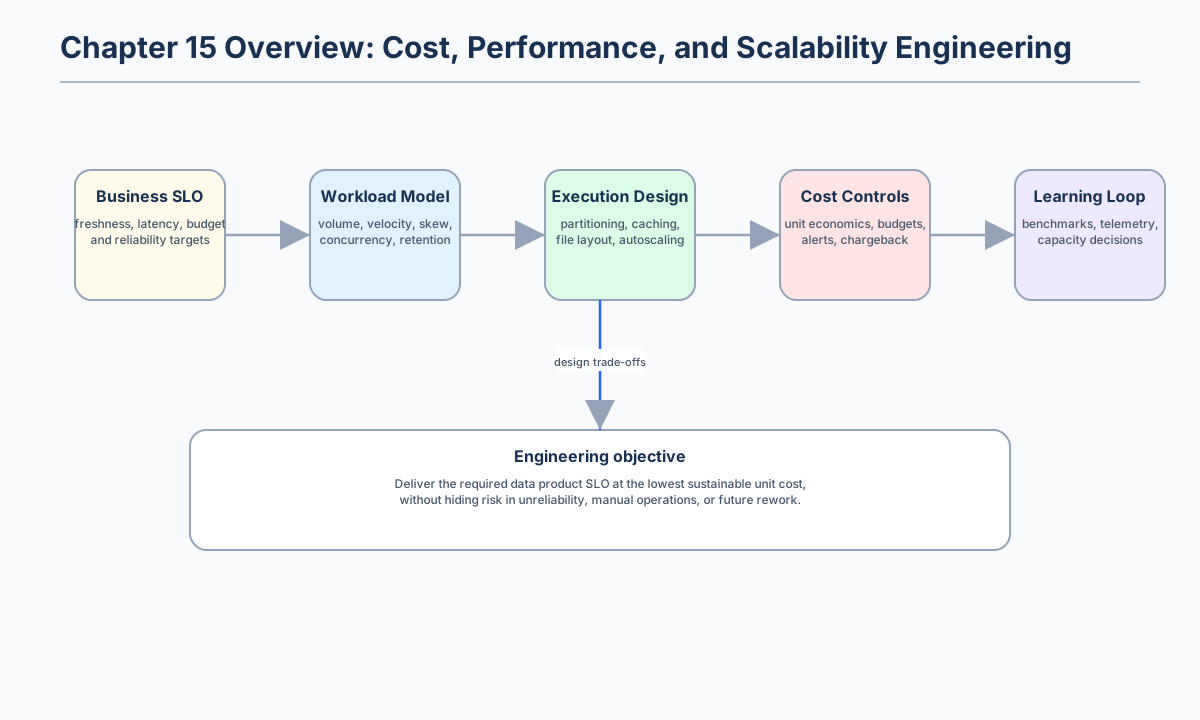
Figure 1:Chapter 15 frames cost, performance, and scalability as a single engineering loop that starts with business service objectives and ends with measured learning.
Opening scenario
TuranMart’s analytics team has just released a new daily trading cockpit for executives. The dashboard shows revenue, order conversion, stockout risk, campaign performance, and delayed deliveries by region. During the first week, everyone is happy. By the second week, analysts complain that the dashboard takes more than two minutes to refresh. By the third week, the finance team notices that the cloud warehouse bill is rising faster than order volume. By the fourth week, the operations team asks whether the same data can refresh every fifteen minutes instead of every hour.
The initial reaction is predictable: add more compute. However, adding capacity without measurement can hide the real problem. The team discovers that the dashboard scans raw clickstream files for every refresh, joins against a large customer table without updated statistics, writes thousands of small files from the previous Spark job, and keeps an expensive warehouse pool running overnight even when no one is using it. The platform does not need one magic optimization. It needs a disciplined cost-performance engineering cycle.
| Business question | Engineering translation | Cost-performance risk | Better design response |
|---|---|---|---|
| “Can executives see today’s revenue by 09:00?” | Freshness target and daily batch completion SLO. | Oversized always-on warehouse used for a once-per-day workload. | Schedule elastic compute only for the batch window and publish a materialized gold table. |
| “Can regional managers drill into product categories interactively?” | p95 query latency and concurrency target. | Dashboard scans raw files and repeats expensive joins. | Pre-aggregate common dimensions, cluster the serving table, and cache only hot aggregates. |
| “Can we refresh campaign metrics every fifteen minutes?” | Incremental processing and streaming or micro-batch requirement. | Full refresh scans historical data every time. | Process only new events and merge into partitioned tables. |
| “Can finance allocate platform cost by team?” | Tagging, ownership, unit-cost metrics, and chargeback model. | Shared jobs and untagged resources hide accountability. | Require workload labels and calculate cost per report, per order, or per gigabyte processed. |
The lesson is that cost, performance, and scalability work begins before tuning commands. It begins by defining the workload, choosing a measurable service objective, and deciding which costs are acceptable for the value delivered.
Learning objectives
By the end of this chapter, you should be able to design and evaluate cost-aware data systems instead of treating optimization as an afterthought. The practical artifact is a reproducible benchmark result and an optimization checklist that can be reused during architecture reviews.
| Objective | What you should be able to do | Evidence in the chapter artifact |
|---|---|---|
| Model workloads | Translate a data product requirement into volume, velocity, concurrency, latency, freshness, retention, and reliability targets. | A workload profile for the TuranMart dashboard. |
| Compare trade-offs | Explain storage and compute trade-offs across file formats, partitioning, compression, caching, indexing, and autoscaling. | A benchmark recommendation that names both improvement and cost. |
| Benchmark fairly | Measure median runtime, p95 runtime, throughput, database size, rows processed per second, and cost proxies. | benchmark_results.csv produced by the Chapter 15 lab. |
| Diagnose bottlenecks | Investigate small files, missing statistics, skewed joins, unnecessary scans, cache misuse, and concurrency pressure. | A diagnostic sequence that starts from evidence rather than guesses. |
| Operationalize optimization | Convert a successful tuning change into scheduled maintenance, guardrails, and documentation. | A completed optimization checklist and production rollout note. |
15.1 Key concepts: cost, performance, and scale as one system
A workload model is a compact description of how a data product behaves under realistic demand. It should be written before selecting a warehouse size, Spark cluster, Kafka partition count, or storage layout. Without a workload model, teams often confuse peak data size with actual system demand. A monthly 10 TB historical table may be less demanding than a 30 GB operational dataset queried by hundreds of users every morning.
A practical workload model has seven dimensions. Volume describes how much data is stored and scanned. Velocity describes how quickly new data arrives. Concurrency describes the number of simultaneous users or jobs. Latency describes how quickly a result must be returned. Freshness describes how old the result is allowed to be. Retention describes how long data must remain queryable. Reliability describes how often the system must meet the target rather than merely how it behaves in a successful demo.
| Concept | Definition | Why it matters for data engineers |
|---|---|---|
| Workload model | A description of data size, arrival rate, access pattern, concurrency, latency, freshness, retention, and reliability. | It prevents teams from choosing infrastructure based only on table size or vendor defaults. |
| Service-level objective (SLO) | A measurable target for service behavior, such as p95 dashboard latency below eight seconds or daily completion by 08:45. | It gives optimization work a product-level goal. |
| Unit economics | A cost metric tied to business output, such as cost per order, report, gigabyte processed, or feature generated. | It makes cost discussions specific enough for engineering and finance to improve together. |
| Cost proxy | A measurable local or platform-specific approximation of cost, such as runtime, vCPU-seconds, bytes scanned, database size, or warehouse credits. | It allows benchmark comparison even when exact billing data is unavailable. |
| Scalability | The ability to maintain acceptable service as data volume, user concurrency, freshness expectations, or governance requirements grow. | It shifts the design question from “Does it work today?” to “Will it keep working under growth?” |
Cloud cost-optimization guidance emphasizes that cloud resources are generally consumed as operating expenditure, which makes continuous measurement and adjustment essential rather than optional.[1] FinOps guidance reaches the same conclusion from an operating-model perspective: optimization is not a one-time cleanup project but continuous collaboration among engineering, finance, procurement, product, and leadership.[2] For data engineers, the practical consequence is simple: every important data product should have an owner, a workload label, and a unit metric.
| Dimension | Questions to ask | Example TuranMart target | Design implication |
|---|---|---|---|
| Volume | How many rows, files, partitions, and bytes are stored and scanned? | 1.2 billion clickstream events retained for 400 days. | Use columnar storage, partition pruning, compaction, and lifecycle policies. |
| Velocity | How fast does new data arrive? | 2,000 events per second during campaigns. | Use streaming or micro-batch ingestion, backpressure monitoring, and elastic consumers. |
| Concurrency | How many users or jobs run at once? | 60 managers open the dashboard at 09:00. | Separate interactive and batch workloads or use workload-management queues. |
| Latency | How fast must queries or jobs finish? | Dashboard p95 under 8 seconds. | Pre-aggregate, cache hot data, and avoid raw-table joins in the serving layer. |
| Freshness | How current must the answer be? | Sales facts no more than 15 minutes old. | Prefer incremental processing over full refresh. |
| Retention | How long must data remain accessible? | Detailed events for 90 days; aggregates for 3 years. | Move old detailed data to cheaper storage and keep compact aggregates online. |
| Reliability | How often may the system miss its target? | Daily executive dataset succeeds by 08:45 on 99% of business days. | Add SLOs, retries, alerts, and capacity buffers for critical jobs. |
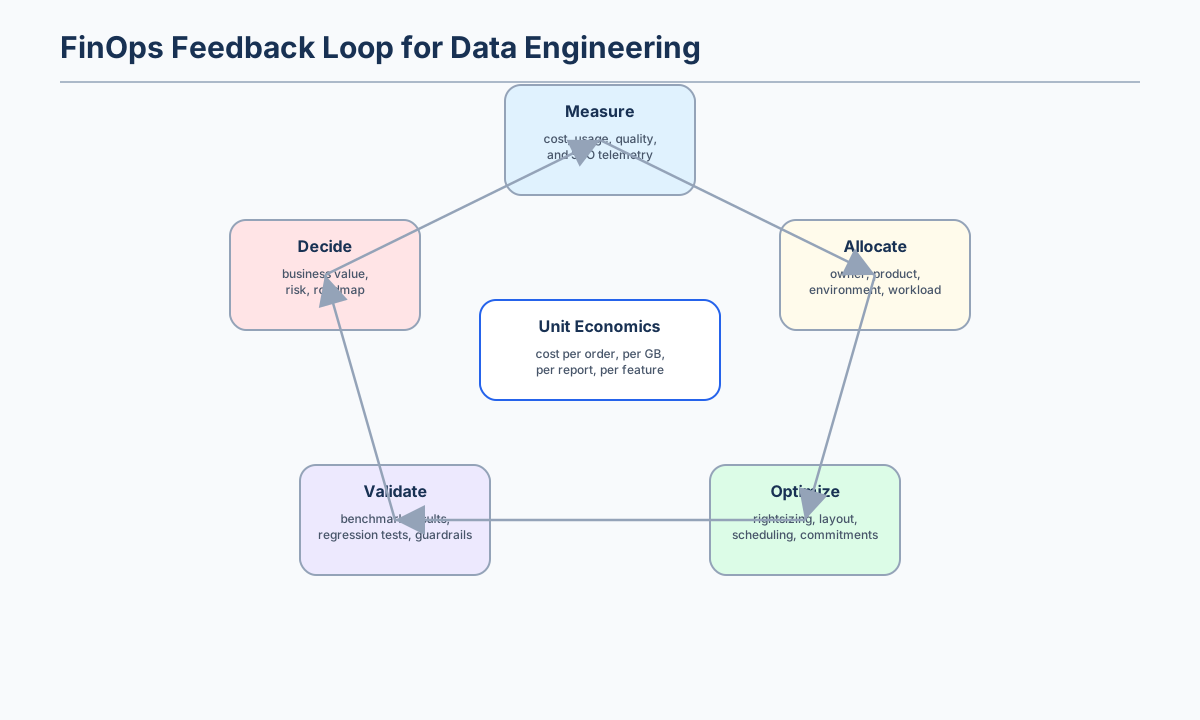
Figure 2:A FinOps feedback loop turns platform telemetry into engineering decisions. The center of the loop is unit economics: cost per order, per report, per gigabyte processed, or per feature produced.
Unit economics prevents abstract cost discussions. “The cluster is expensive” is vague. “The nightly recommendation pipeline costs $0.004 per active customer profile and increased by 35% after the new feature join” is actionable. A unit metric should be close enough to business value that non-engineers understand it and technical enough that engineers can improve it.
15.2 Storage and compute trade-offs
Modern data systems separate storage from compute, but separation does not remove trade-offs. It simply makes them easier to see. Object storage may be cheap, durable, and scalable, but poorly organized files can make every query expensive. A warehouse may scale compute elastically, but a bad data model can still scan too many bytes. A cache can reduce latency, but it can also serve stale data or waste memory.
Apache Parquet is a common example of a storage choice that improves analytical workloads. The Parquet project describes it as an open-source, column-oriented file format designed for efficient storage and retrieval, with high-performance compression and encoding schemes for bulk data.[3] This matters because many analytical queries read a subset of columns. If a query needs order_date, region, and amount, a columnar file can avoid reading wide text fields that are irrelevant to the answer.
| Design choice | Improves | Can hurt | Use when | Avoid when |
|---|---|---|---|---|
| Columnar formats such as Parquet or ORC | Scan efficiency, compression, predicate pushdown, column pruning. | Small writes and row-level updates. | Data is read analytically and written in batches. | The workload is mostly single-row transactional updates. |
| Partitioning by date or business key | File pruning, lifecycle management, incremental processing. | Metadata overhead and skew when cardinality is too high. | Queries filter predictably by date, tenant, region, or topic. | The partition column has millions of values or is rarely filtered. |
| Clustering or sorting | Range pruning, compression, join locality. | Extra write-time cost and compaction complexity. | Queries repeatedly filter or join on the same columns. | Data is rarely queried or access patterns are unknown. |
| Caching and materialized views | Low-latency repeated reads. | Staleness, memory use, and invalidation complexity. | The same aggregate is read often with clear freshness rules. | Queries are ad hoc, one-time, or require real-time raw data. |
| Autoscaling compute | Handles variable demand and reduces idle time. | Cold starts, quota limits, and unpredictable performance. | Workload demand has clear peaks and troughs. | A hard real-time workload requires constant low latency. |
| Reserved capacity or commitments | Lower rate for predictable usage. | Lock-in and underutilization risk. | Baseline demand is stable and measured. | Demand is experimental or highly uncertain. |
The strongest storage optimization is often not a special engine feature. It is a better data layout. A gold analytics table that contains one row per product, region, and day may cost less and serve users faster than repeatedly joining raw event streams. This is why Chapter 7’s lakehouse design, Chapter 10’s analytics modeling, and Chapter 12’s observability concepts become practical cost controls in this chapter.
15.3 Production design pattern: the cost-performance engineering loop
A production team should not tune randomly. It should follow a loop: define the product objective, baseline the current workload, isolate one change, validate correctness, compare the result, operationalize the improvement, and guard against regression. This loop protects the team from two common mistakes. The first mistake is treating a faster query as successful even when it changes the result. The second mistake is treating a cheaper design as successful even when it violates freshness or reliability requirements.
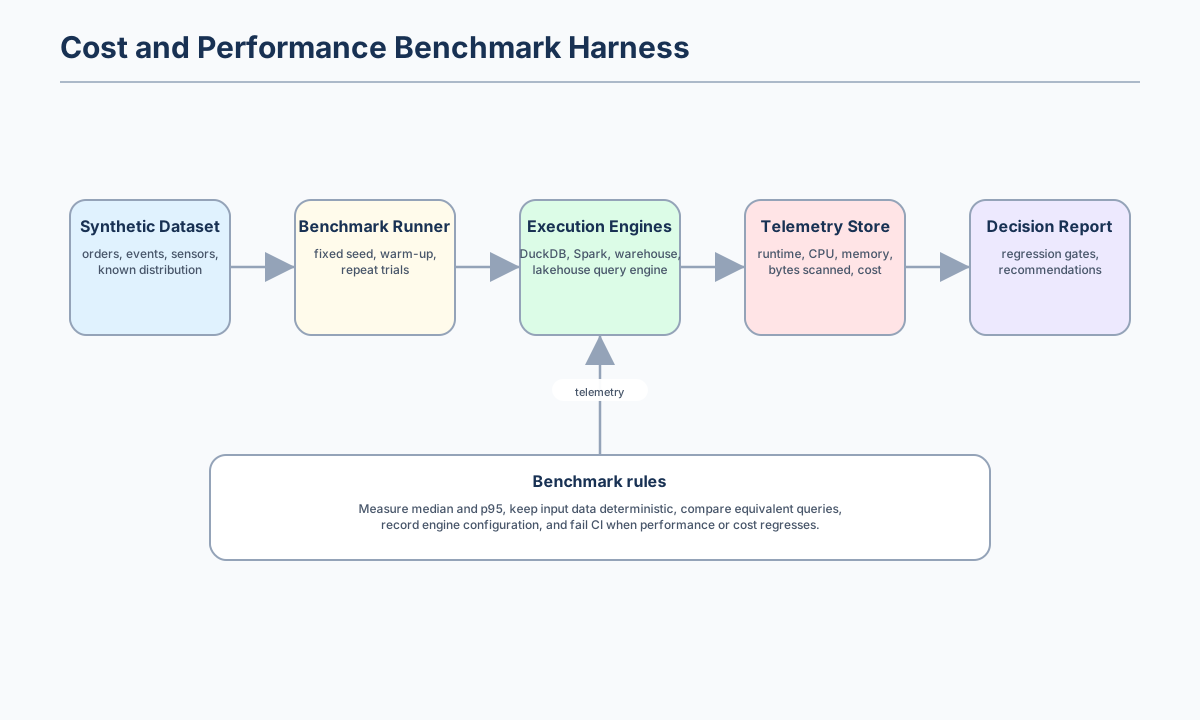
Figure 3:A benchmark harness should make experiments repeatable. Deterministic data, repeat trials, captured telemetry, and a decision report are more valuable than a single impressive timing number.
A benchmark is the act of measuring a workload under controlled conditions. It is also easy to misuse. A benchmark that changes the dataset, query, cluster size, and cache state at the same time cannot tell you which change mattered. A benchmark that reports only the best run hides tail latency. A benchmark that ignores data size and resource usage may reward a solution that is fast only because it is over-provisioned.
| Stage | Engineering question | Required evidence | Decision rule |
|---|---|---|---|
| Define | What user outcome are we protecting? | Owner, SLO, workload class, unit-cost metric. | Do not optimize until the target is measurable. |
| Baseline | How does the current design behave? | Runtime distribution, p95, bytes scanned, file count, database size, resource use. | Keep the baseline reproducible. |
| Isolate | Which single design change are we testing? | One changed variable, same dataset, same query intent, same trial count. | Reject experiments that change too many factors. |
| Validate | Did the answer remain correct and fresh enough? | Row counts, reconciliation checks, data tests, freshness metrics. | A fast wrong answer is a regression. |
| Compare | Did the change improve the product objective enough to justify its cost? | Absolute improvement, relative improvement, storage overhead, operational complexity. | Promote only if the trade-off is explicit. |
| Operationalize | How will the improvement keep working next month? | Scheduled compaction, statistics refresh, cache invalidation, budget guardrails, runbook update. | Manual optimizations decay unless automated. |
| Guard | How will future changes avoid undoing the gain? | Performance regression test, cost anomaly alert, dashboard SLO alert. | Add a guardrail before declaring success. |
A useful data-engineering benchmark should record the dataset version, row count, file count, file size, query text, engine version, hardware or cluster configuration, number of trials, cache state, median runtime, p95 runtime, throughput, bytes scanned, memory use, and cost proxy. The cost proxy might be warehouse credits, vCPU-seconds, executor-hours, gigabytes scanned, or simply “database size plus runtime” in a local lab.
The following benchmark table is illustrative, not a universal claim. It shows the kind of evidence a team should collect before changing a production workload. The same query is measured against three possible designs for a daily regional revenue report.
| Variant | Median runtime | p95 runtime | Data scanned | Storage overhead | Operational complexity | Recommendation |
|---|---|---|---|---|---|---|
| Raw events joined at dashboard time | 96 s | 141 s | 820 GB | Low | Low apparent complexity, high runtime cost. | Reject for executive dashboard because latency and scan cost are too high. |
| Partitioned Parquet silver table | 18 s | 27 s | 125 GB | Moderate | Requires compaction and partition hygiene. | Accept for analyst exploration and scheduled jobs. |
| Gold daily revenue aggregate | 2.4 s | 3.8 s | 1.7 GB | Small additional aggregate table. | Requires incremental model and freshness monitoring. | Use for executive dashboard. |
The table demonstrates a recurring pattern: performance gains often come from scanning less data, not from buying a larger machine. For cloud data warehouses that charge by bytes processed, scanned bytes are also a cost driver. For Spark clusters, scanned bytes often translate into network transfer, shuffle, and executor time.
15.4 Partitioning, file size, and the small-file problem
Partitioning is one of the most powerful and most dangerous tools in data engineering. Good partitioning allows engines to skip irrelevant data. Bad partitioning creates too many directories, too many small files, too much metadata, and too little parallel work per task.
Spark SQL’s default file scan partition target is 128 MB through spark.sql.files.maxPartitionBytes, and its default shuffle partition count is 200 through spark.sql.shuffle.partitions.[4] These defaults are useful starting points, not universal laws. A 20 GB batch job and a 20 TB batch job should not be treated the same way. A query with severe key skew can be slow even when the total number of partitions looks reasonable.
| Symptom | Likely cause | Evidence to collect | Typical fix |
|---|---|---|---|
| Thousands of files below 10 MB | Streaming or micro-batch writes without compaction. | File-size histogram by table and partition. | Add scheduled compaction and target larger output files. |
| Query scans full table despite date filter | Filter does not match partition column or table statistics are missing. | Query plan, partition predicates, bytes scanned. | Align partitioning with access pattern and refresh statistics. |
| One Spark task runs much longer than others | Skewed key or uneven file sizes. | Task-duration histogram and shuffle read per task. | Salt skewed keys, enable adaptive execution, or rebalance partitions. |
| Too many output files | Excessive shuffle partitions or over-parallelized writes. | Output file count and average size. | Coalesce or repartition before writing. |
| Slow dashboard but fast raw query after first run | Cache effect or materialized result reuse. | Cold-run and warm-run timings. | Use explicit materialized views with freshness controls instead of accidental cache reliance. |
A practical rule is to partition by columns that are common in filters and have bounded cardinality. Date is often a good first partition because retention and incremental processing are date-based. Region may be useful if there are a small number of regions and users frequently filter by region. Customer ID is usually a bad partition column because it creates too many partitions and uneven data distribution.
15.5 Caching, statistics, and query planning
Caching should be treated as an optimization contract, not a lucky accident. Spark SQL can cache tables in an in-memory columnar format and scan only required columns while automatically tuning compression to reduce memory pressure.[4] This is powerful when the same intermediate dataset is reused many times, but wasteful when the cached data is read once.
Query optimizers also need statistics. Spark SQL documentation explains that Spark can use statistics from data sources such as Parquet metadata, catalog statistics such as those produced by ANALYZE TABLE, and runtime statistics from adaptive query execution.[4] Missing or inaccurate statistics can lead to poor join order, unnecessary shuffle, or failure to use broadcast joins. Spark’s default automatic broadcast join threshold is 10 MB, which means a dimension table slightly above that size may require either a design change, a configuration change, or a different join strategy.[4]
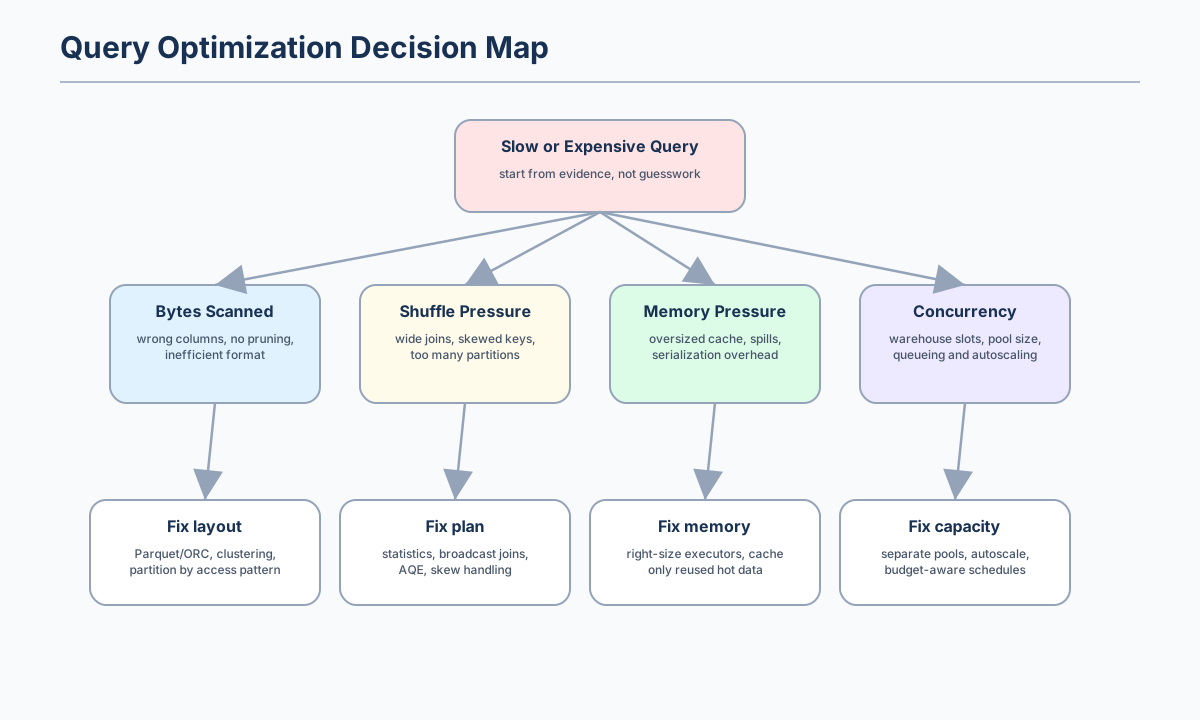
Figure 4:A slow query should be diagnosed from evidence. Start with bytes scanned, shuffle pressure, memory pressure, and concurrency before changing engine settings.
The following diagnostic sequence is often more effective than random tuning.
| Step | Question | Tooling evidence | Decision |
|---|---|---|---|
| 1 | Is the query scanning more data than the answer requires? | Query plan, bytes scanned, partition predicates, selected columns. | Fix file format, partitioning, clustering, or materialized aggregate. |
| 2 | Is the query moving too much data across the network? | Shuffle read/write, task skew, join strategy. | Update statistics, broadcast small dimensions, handle skew, or redesign joins. |
| 3 | Is the query spilling or garbage collecting? | Executor memory, spill metrics, GC time, cache usage. | Reduce cached data, increase memory, use columnar formats, or change data structures. |
| 4 | Is the system overloaded by concurrency? | Queue time, active sessions, warehouse utilization, cluster CPU. | Separate workload pools, autoscale, throttle non-critical jobs, or precompute results. |
| 5 | Did the optimization change correctness or freshness? | Data tests, row counts, reconciliation checks, freshness metrics. | Keep the optimization only if it preserves the data contract. |
Spark’s general tuning documentation warns that distributed workloads can be bottlenecked by CPU, network bandwidth, or memory; when data fits in memory, network bandwidth is often a bottleneck.[5] It also notes that Java objects can consume two to five times more space than the raw data they contain, and that Kryo serialization can be significantly faster and more compact than Java serialization, often as much as ten times, though it requires registration for best performance.[5] These details matter because “more memory” is not the same as “better memory behavior.”
15.6 Scalability patterns for data platforms
Scalability is the ability to maintain acceptable service as demand grows. In data platforms, demand can grow through more data, more users, more models, more dashboards, more freshness expectations, or more governance requirements. Each type of growth has a different scaling strategy.
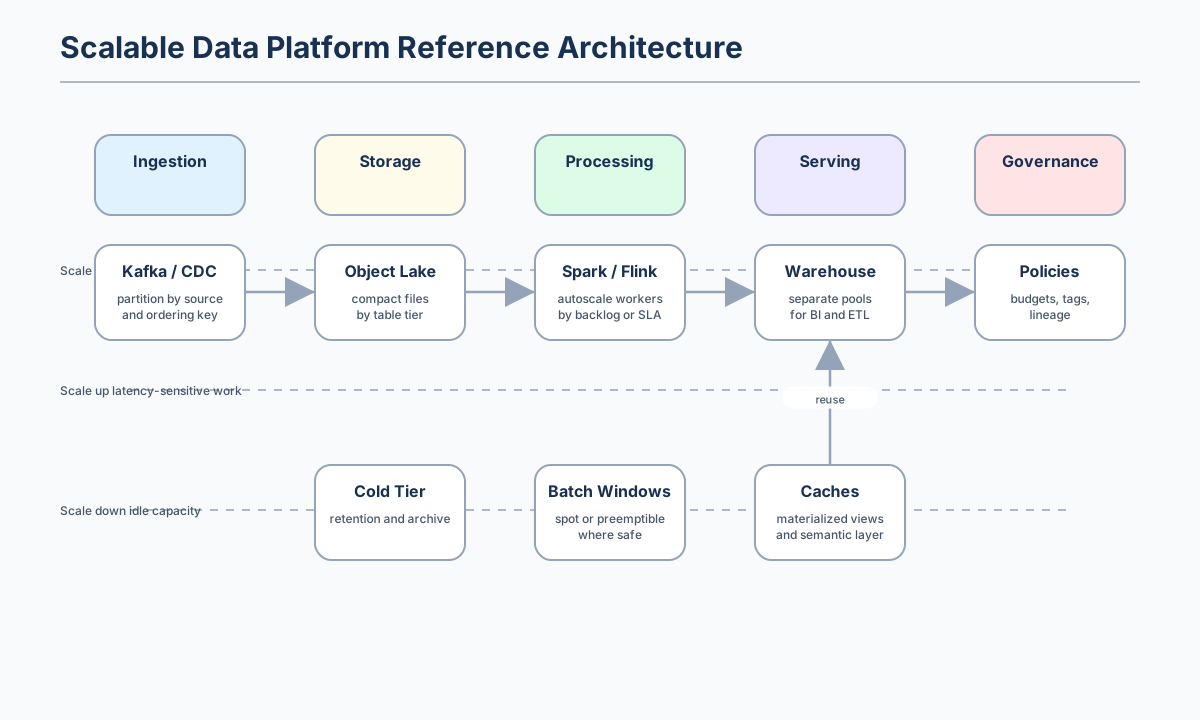
Figure 5:A scalable data platform uses different scaling patterns at different layers. Ingestion usually scales out, serving may scale up or precompute, and governance scales through policy automation.
A mature platform does not run every workload on the same pool. Interactive BI, batch ETL, streaming jobs, ad hoc exploration, and machine-learning feature generation have different tolerance for latency, failure, and cost. Separating them protects users from noisy neighbors and lets the platform choose different cost controls for each class.
| Workload class | Scaling pattern | Cost control | Reliability control |
|---|---|---|---|
| Batch ETL | Scale out during scheduled windows, then scale down. | Use ephemeral clusters, spot or preemptible capacity where safe, and incremental processing. | Retries, checkpointing, idempotent writes, and deadline alerts. |
| Interactive BI | Scale for concurrency and low p95 latency. | Pre-aggregate, materialize common metrics, and separate BI compute pools. | Query timeouts, workload queues, and dashboard freshness indicators. |
| Streaming | Scale consumers by partition, backlog, and event-time lag. | Right-size retention, compact topics, and avoid over-partitioning. | Backpressure, checkpointing, dead-letter queues, and lag alerts. |
| Data science exploration | Scale elastically and isolate from production. | Budget limits, auto-shutdown notebooks, sampled datasets. | Sandboxed environments and controlled access to sensitive data. |
| AI and feature pipelines | Scale around model release and inference schedules. | Track cost per feature, embedding, or training example. | Feature freshness, training-serving skew tests, and lineage. |
The FinOps Foundation’s 2026 reporting shows why cost-performance engineering is becoming broader than traditional cloud infrastructure. Its survey announcement says that 1,192 respondents participated, that 98% now manage AI spend, and that this share rose from 31% two years earlier.[6] This trend matters for data teams because AI workloads depend on reliable data pipelines, feature generation, embeddings, model evaluation, and serving infrastructure.
Guided lab: benchmark a TuranMart event workload
The lab assets for this chapter live under shared/labs/ch15_cost_performance_scalability/. The lab uses a deterministic synthetic event workload so that readers can reproduce the same experiment on different machines.
In the starter version, you will generate TuranMart events, load them into SQLite, and compare a baseline aggregation query with an indexed variant. SQLite is intentionally used as the first engine because it requires no external services. The method is the important part: fixed seed, repeat trials, median and p95 timing, database size, rows processed per second, and a written recommendation. After completing the starter lab, you can run the same dataset in DuckDB, Spark, or a cloud warehouse.
| Lab material | Link | Purpose |
|---|---|---|
| Lab README | ../../shared/labs/ch15_cost_performance_scalability/README.md | Explains the benchmark objective, files, run command, and extension tasks. |
| Starter script | ../../shared/labs/ch15_cost_performance_scalability/benchmark_runner.py | Generates synthetic events, loads SQLite databases, runs trials, and writes metrics. |
| Generated output folder | ../../shared/labs/ch15_cost_performance_scalability/output/ | Created when the benchmark runs; contains events.csv, SQLite databases, and benchmark_results.csv. |
| Solution checklist | ../../shared/solutions/ch15_cost_performance_scalability/optimization_checklist.md | Provides the interpretation template for deciding whether an optimization should be promoted. |
From the repository root, run the starter benchmark.
python shared/labs/ch15_cost_performance_scalability/benchmark_runner.py --rows 100000The script writes results to shared/labs/ch15_cost_performance_scalability/output/benchmark_results.csv. Your task is to compare the baseline and optimized variants, calculate the relative improvement, identify the trade-off, and decide whether the optimization should be promoted to production.
| Lab step | Expected output | Reflection question |
|---|---|---|
| Generate deterministic events. | events.csv with a fixed seed and requested row count. | Why is deterministic data important for benchmark comparison? |
| Run the baseline query. | Median and p95 runtime for the unindexed table. | What bottleneck do you expect before seeing the result? |
| Run the optimized variant. | Median and p95 runtime for the indexed table. | Did the index improve runtime enough to justify storage overhead? |
| Compare database sizes. | Baseline and indexed SQLite file sizes. | What is the storage-performance trade-off? |
| Write a recommendation. | Completed checklist in the solution format. | Would your answer change for append-only, update-heavy, or real-time workloads? |
The benchmark result is machine-dependent, but the output should have the following shape.
Wrote shared/labs/ch15_cost_performance_scalability/output/benchmark_results.csv
{'variant': 'baseline', 'input_rows': '100000', 'database_mb': '...', 'median_seconds': '...', 'p95_seconds': '...', 'rows_per_second_at_median': '...'}
{'variant': 'indexed', 'input_rows': '100000', 'database_mb': '...', 'median_seconds': '...', 'p95_seconds': '...', 'rows_per_second_at_median': '...'}
Works on my machine checklist
| Item | Command or evidence |
|---|---|
| Python can run the lab script. | python --version shows Python 3.10 or newer. |
| Starter benchmark completes. | python shared/labs/ch15_cost_performance_scalability/benchmark_runner.py --rows 100000 exits successfully. |
| Output exists. | shared/labs/ch15_cost_performance_scalability/output/benchmark_results.csv is created. |
| Results are reproducible. | Re-running the same command produces similar median and p95 values within normal machine noise. |
| Recommendation is documented. | The completed optimization checklist explains the measured gain and the trade-off. |
Troubleshooting notes
| Problem | Likely cause | Fix |
|---|---|---|
python: command not found | The operating system exposes Python as python3 instead of python. | Run python3 shared/labs/ch15_cost_performance_scalability/benchmark_runner.py --rows 100000. |
| Benchmark feels slow | The row count is high for the local machine, antivirus is scanning generated files, or the disk is slow. | Start with --rows 50000, close heavy applications, and compare trends rather than absolute numbers. |
| Results vary between runs | Background CPU load and file-system cache can affect local timings. | Run more trials with --trials 15 and compare median and p95 rather than a single run. |
| Indexed database is larger | The index stores additional data structures. | Treat this as the intended storage-performance trade-off and decide whether the runtime gain is worth it. |
| No rows are returned | The dataset or query was modified so that no purchase events match. | Restore the starter query or inspect events.csv for purchase rows. |
Common pitfalls and operational lessons
The most common optimization failure is optimizing the wrong workload. A team may tune a developer’s ad hoc query while the real production pain is a scheduled dashboard refresh. A benchmark should therefore begin with the data product owner and the user-facing SLO, not with a tool setting.
| Pitfall | Why it is dangerous | Operational lesson |
|---|---|---|
| Reporting only the fastest run | It hides tail latency and normal machine noise. | Report median and p95, and keep trial count visible. |
| Ignoring cache state | Warm-cache results can exaggerate production performance. | Separate cold-run and warm-run measurements when cache behavior matters. |
| Adding partitions without checking cardinality | High-cardinality partitions create metadata overhead and small files. | Partition for predictable filters and bounded cardinality. |
| Scaling compute before fixing data layout | Larger clusters can hide waste while increasing cost. | Check bytes scanned, file sizes, and query plan before buying capacity. |
| Treating an index or materialized view as free | It may increase storage, write cost, and freshness complexity. | Record the operational trade-off in the recommendation. |
| Forgetting correctness checks | A faster query can silently drop data or change business logic. | Reconcile row counts, totals, and freshness before promoting the change. |
Optimization work becomes durable only when it is connected to operations. If a team compacts files once but never schedules compaction, the small-file problem will return. If it updates table statistics once but never refreshes them after large loads, the query optimizer will drift back toward poor plans. If it creates a cache without an invalidation rule, users may receive stale answers. A production optimization is not complete until the maintenance behavior is part of the system.
Exercises
Easy
Run the lab with --rows 50000, --rows 100000, and --rows 300000. Create a table showing how median runtime and rows per second change as the dataset grows. Explain whether the growth looks linear on your machine.
Medium
Modify the benchmark query to group by event_type as well as region and date. Does the index still help? Explain why or why not by comparing the query predicate, grouping columns, and index definition.
Medium
Add a second index on event_ts. Measure the database size and runtime again. Decide whether the additional index is justified for the starter workload. Your answer should mention both runtime and storage overhead.
Challenge
Design a Parquet-based version of the same benchmark. Choose partition columns, target file size, compaction schedule, and engine to test. Explain the access pattern that justifies your design and identify at least one case where your partitioning choice would perform poorly.
Team exercise
Write a one-page optimization proposal for the TuranMart executive dashboard. Include the SLO, baseline, recommended data layout, cost metric, rollout plan, rollback plan, and a monitoring signal that would detect regression after release.
Review questions
Why is a workload model a better starting point than choosing a larger cluster size?
What is the difference between latency, freshness, and reliability in a dashboard workload?
Why can a columnar format reduce both query runtime and cost for analytical workloads?
How can partitioning improve performance and also create the small-file problem?
Why should benchmarks report p95 runtime rather than only average or best runtime?
What evidence would you collect before deciding that an index, cache, or materialized view is worth its operational cost?
How does unit economics help engineering and finance discuss platform cost without blaming each other?
Summary and next step
Cost, performance, and scalability engineering is the discipline of making data systems economically sustainable while preserving the service objectives that users care about. The key habit is to translate business needs into workload models, then use measurement to guide design. Storage format, partitioning, clustering, caching, query statistics, autoscaling, and workload isolation are not isolated tricks. They are levers in a larger system.
The most important principle is to optimize from evidence. Start with bytes scanned, runtime distribution, file sizes, query plans, resource utilization, and unit economics. Change one variable at a time, validate correctness, document the trade-off, and automate the guardrail. In Chapter 16, you will use the same evidence-driven mindset to select technologies and write architecture decision records, turning optimization lessons into durable platform decisions.