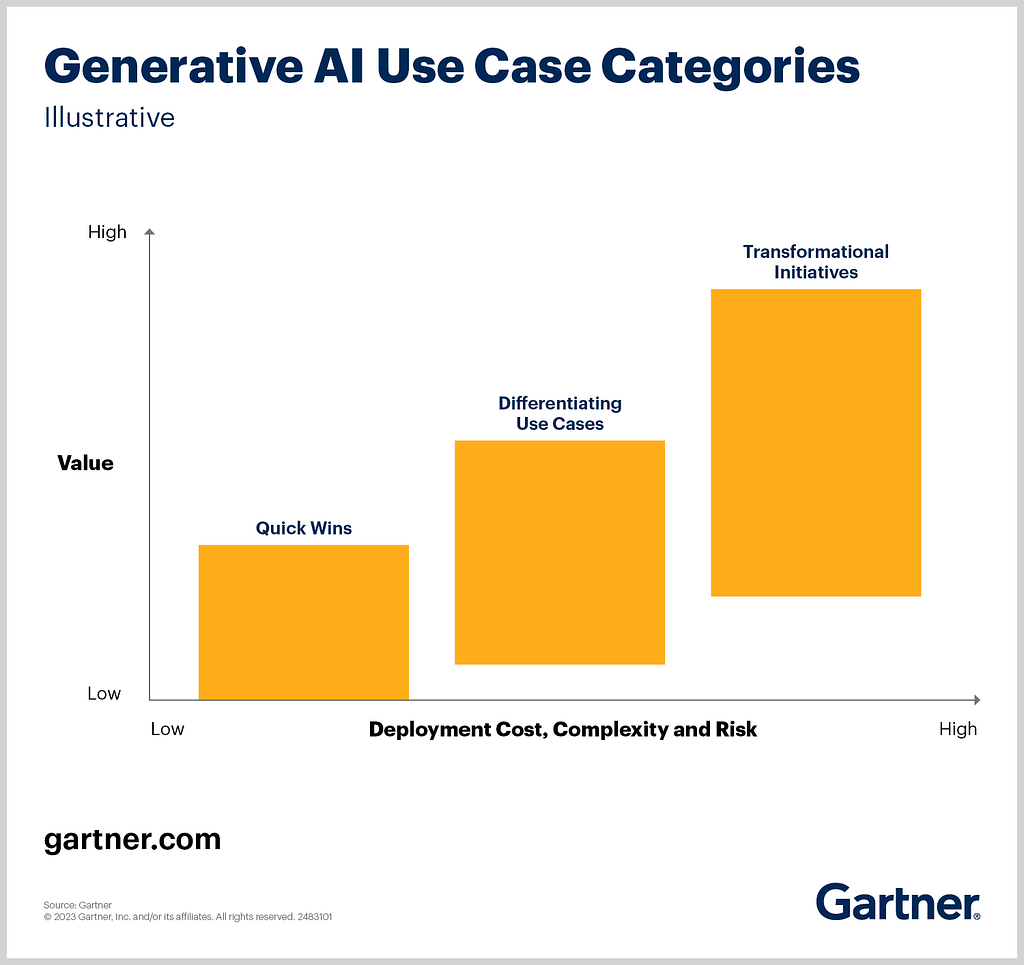
According to Gartner, “Quick Wins” are use cases that:
These projects are ideal for organizations seeking early ROI (Return On Investment) from generative AI without major infrastructure overhauls.
Our solution exemplifies a Quick Win because:
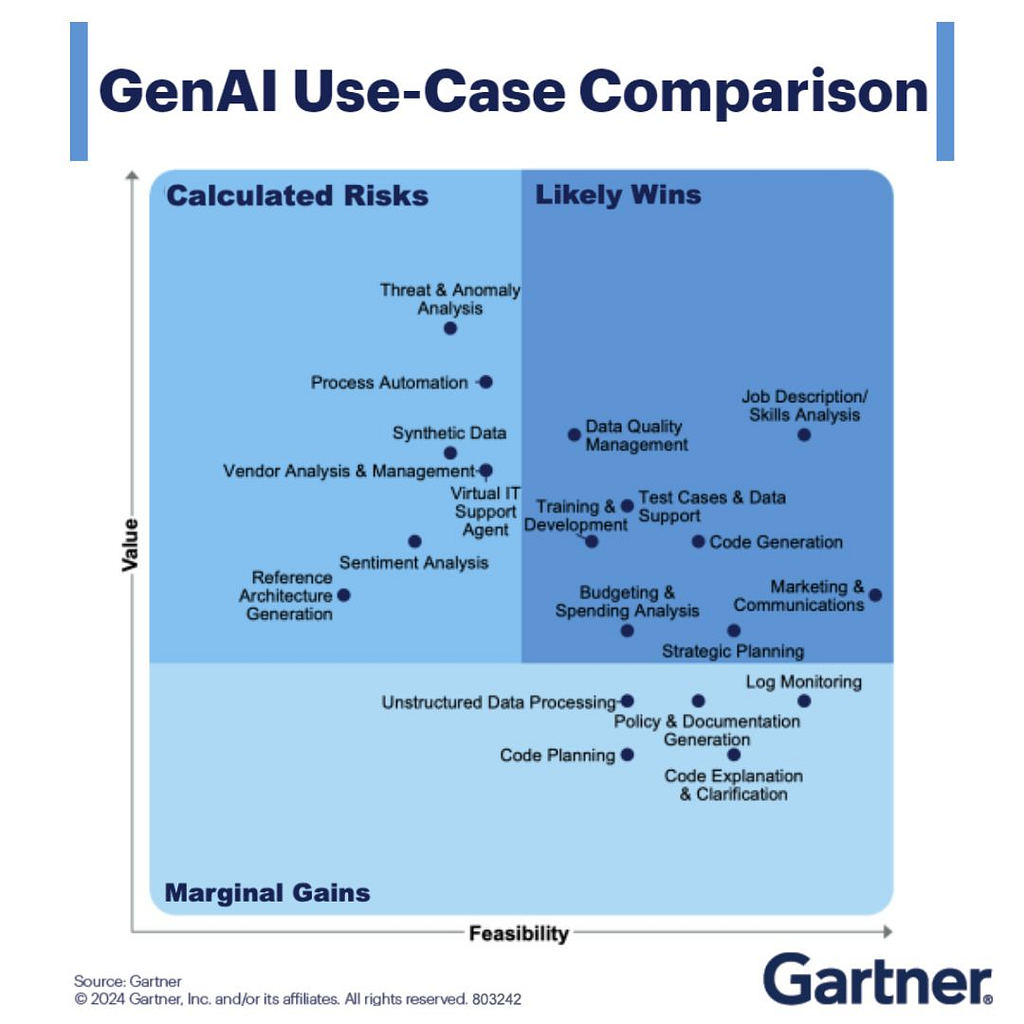
In Gartner’s analysis, code generation (including text-to-SQL) falls in the “Likely Wins” quadrant — high feasibility, high value, low risk. Key takeaways:
2. Scalability:
3. Fast Time-to-Value:
By adopting text-to-SQL solutions, organizations align with Gartner’s recommendations to prioritize low-risk, high-impact AI initiatives. It’s not just automation — it’s about unlocking productivity and accelerating data-driven decisions with minimal upfront investment.
For deeper insights, explore Gartner’s reports:
This structure emphasizes business alignment, risk mitigation, and pragmatic ROI- perfect for executives and decision-makers.
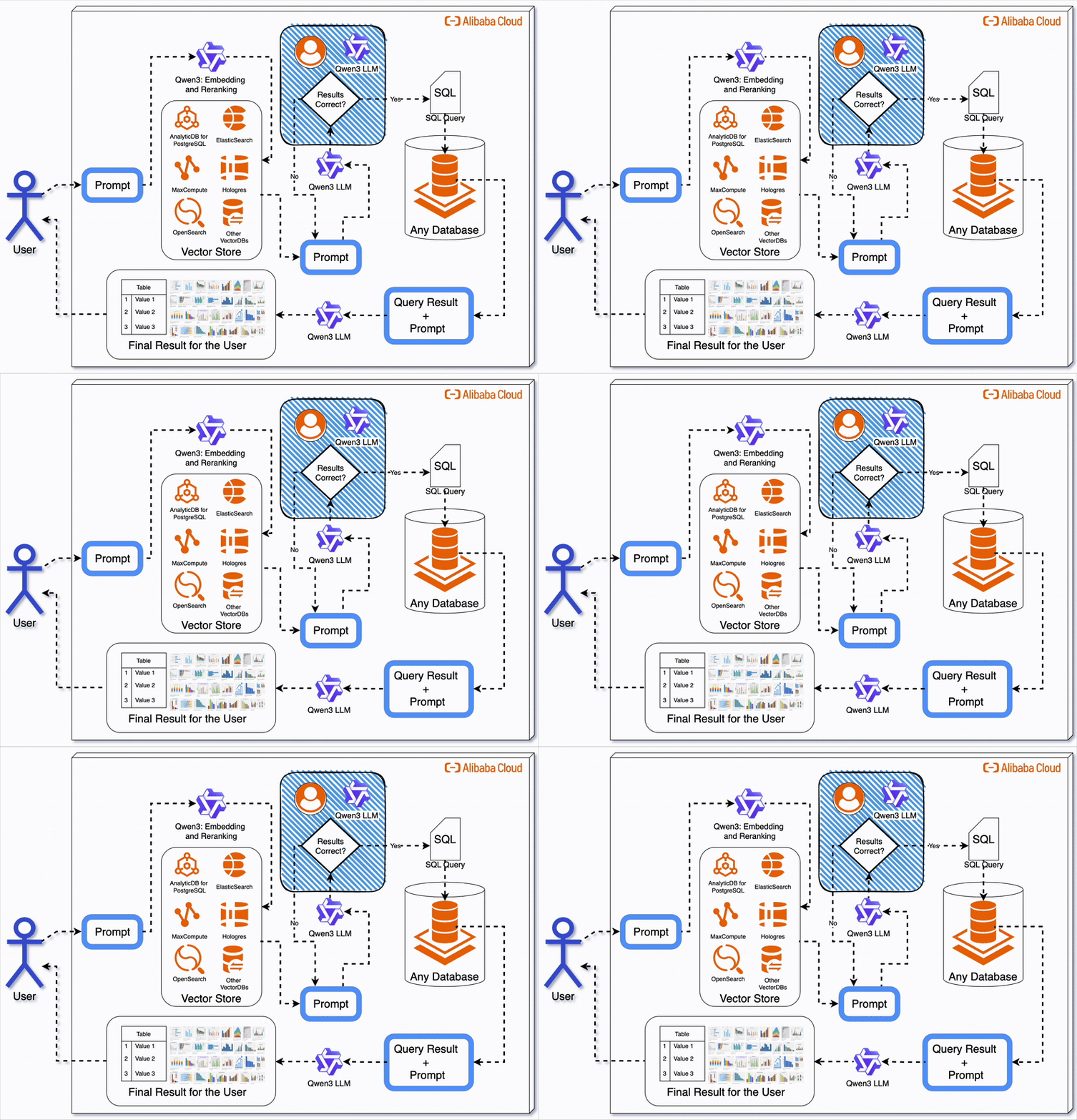
Writing SQL queries is time-consuming, error-prone, and costly. Whether you’re analyzing customer data or generating reports, translating natural language questions into SQL requires a deep understanding of databases. What if you could automate this process using AI, and save costs?
In this article, we’ll build a text-to-SQL chatbot powered by Alibaba Cloud’s Qwen3 (we’ll use Qwen-Max in this example), a state-of-the-art large language model (LLM). This chatbot connects to a PostgreSQL database, converts human queries into SQL, and returns results — all without writing a single line of SQL manually.
You’ll reduce both development time and cloud expenses with Alibaba Cloud’s cost-effective API pricing and Qwen-Max’s high accuracy.
Visit Alibaba Cloud and sign up. Once logged in, navigate to the Model Studio console (link).
Go to the API Key Management page (link) and create a new API key. Store it securely — it’s your access token to Qwen-Max.
Create a virtual environment and install dependencies:
# Create virtual environment
python3 -m venv venv
source venv/bin/activate

# Install required packages
pip install openai python-dotenv psycopg2-binary tabulate
Save the following in requirements.txt:
openai
python-dotenv
psycopg2-binary
tabulate
Run a quick test using the provided example code to verify your API key works.
import os
from openai import OpenAI

try:
    client = OpenAI(
        # If the environment variable is not configured, replace the following line with your API key: api_key="sk-xxx",
        api_key=os.getenv("DASHSCOPE_API_KEY"),
        base_url="https://dashscope-intl.aliyuncs.com/compatible-mode/v1",
    )
    completion = client.chat.completions.create(
        model="qwen-plus",  # Model list: https://www.alibabacloud.com/help/en/model-studio/getting-started/models
        messages=[
            {'role': 'system', 'content': 'You are a helpful assistant.'},
            {'role': 'user', 'content': 'Who are you?'}
            ]
    )
    print(completion.choices[0].message.content)
except Exception as e:
    print(f"Error message: {e}")
    print("For more information, see: https://www.alibabacloud.com/help/en/model-studio/developer-reference/error-code")
Use ApsaraDB for PostgreSQL to set up a managed PostgreSQL instance. Refer to this documentation for details.
Another option is to follow this step-by-step guide to provision a PostgreSQL 17 database on Alibaba Cloud and connect it to your local machine using psql.
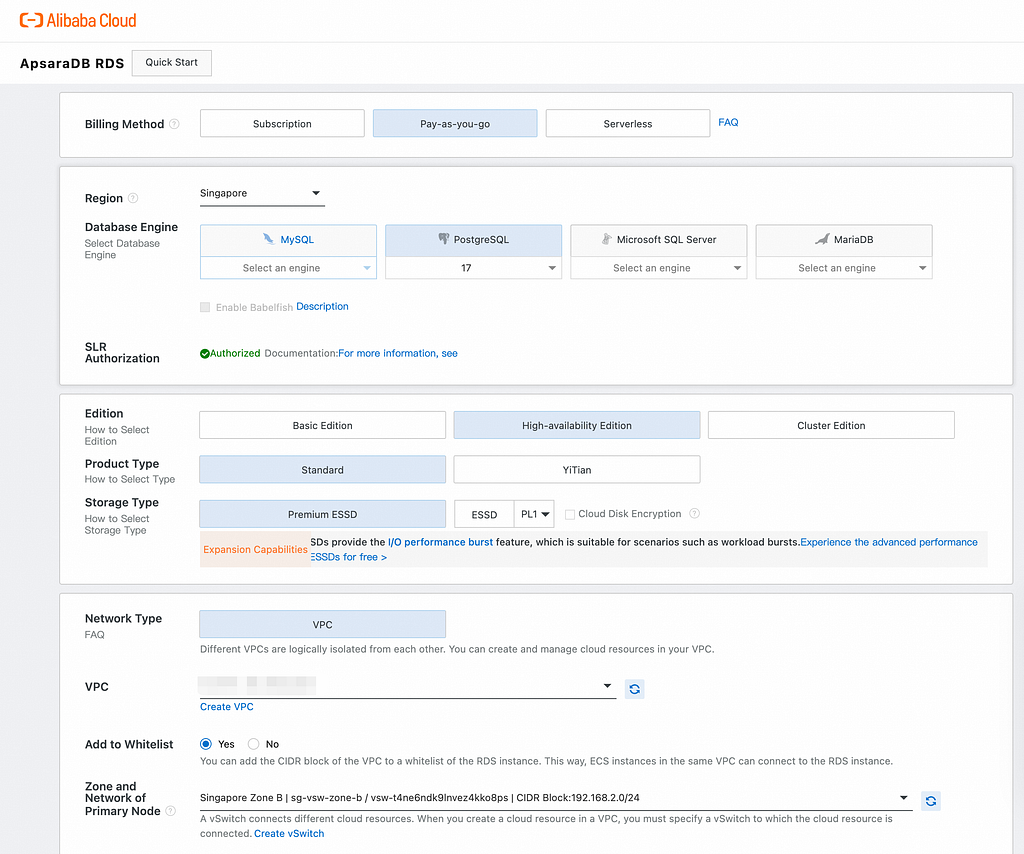
Use the interface shown in the image above to set up your PostgreSQL 17 instance:
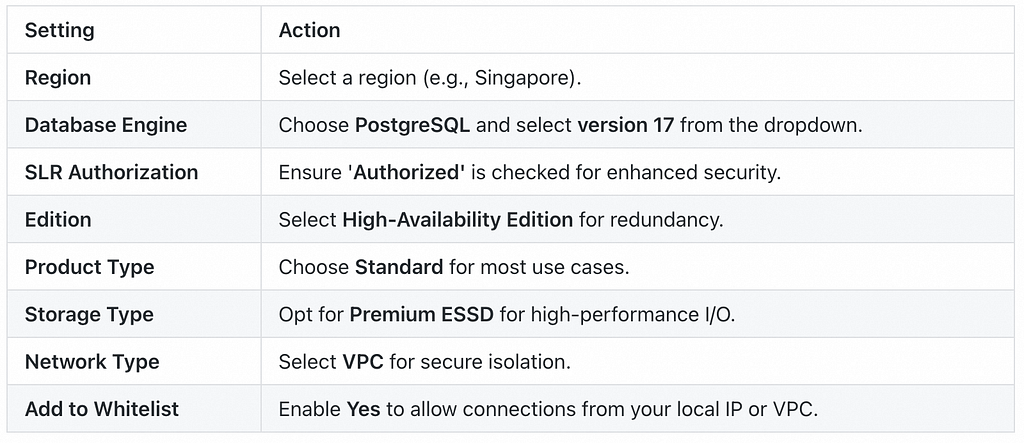
Step 3: Finalize and Launch
Once the instance is active:
Install psql on your local machine (if not already installed), then connect using:
psql -h <ENDPOINT> -U <USERNAME> -d <DATABASE_NAME> -p <PORT>
Replace placeholders with your values (e.g., -d postgres for the default database).
For deeper configuration details, refer to Alibaba Cloud’s official documentation:
On macOS/Linux, run:
brew install postgresql  # macOS
sudo apt install postgresql-client  # Ubuntu
Download the DVD Rental sample database and restore it:
# Restore the database
pg_restore -U your_user -h your_host -p your_port -d dvdrental dump_file.tar
Run a sample query to confirm everything works:
SELECT * FROM film LIMIT 5;
The following script uses Qwen-Max to convert natural language queries into SQL and executes them on PostgreSQL.
import os
import psycopg2
from openai import OpenAI
from dotenv import load_dotenv
from tabulate import tabulate

load_dotenv()
client = OpenAI(
    api_key=os.getenv("DASHSCOPE_API_KEY"),
    base_url="https://dashscope-intl.aliyuncs.com/compatible-mode/v1"
)
def generate_sql_query(natural_language_query):
    system_prompt = """
You are a helpful assistant trained to convert natural language queries into SQL statements.
The database schema includes the following tables:
- film_category (category_id, name)
- film (film_id, title, category_id)
- inventory (inventory_id, film_id, store_id)
- rental (rental_id, inventory_id, customer_id, return_date, rental_date)
- payment (payment_id, customer_id, staff_id, rental_id, amount, payment_date)
Generate a valid SQL query that answers the user's question.
"""
    response = client.chat.completions.create(
        model="qwen-max",
        messages=[
            {"role": "system", "content": system_prompt},
            {"role": "user", "content": natural_language_query}
        ],
        temperature=0.2
    )
    sql_query = response.choices[0].message.content.strip()

    # Extract SQL between ```sql and ```
    start_marker = "```sql"
    end_marker = "```"
    start_idx = sql_query.find(start_marker)
    end_idx = sql_query.find(end_marker, start_idx + len(start_marker))
    if start_idx != -1 and end_idx != -1:
        sql_query = sql_query[start_idx + len(start_marker):end_idx]
    elif start_idx != -1:
        sql_query = sql_query[start_idx + len(start_marker):]
    elif end_idx != -1:
        sql_query = sql_query[:end_idx]
    sql_query = sql_query.strip()
    # Fallback to 'select' keyword
    if not sql_query.lower().startswith("select"):
        select_index = sql_query.lower().find("select")
        if select_index != -1:
            sql_query = sql_query[select_index:]
    return sql_query.strip()
def execute_sql_query(sql_query):
    conn = psycopg2.connect(
        dbname=os.getenv("DB_NAME"),
        user=os.getenv("DB_USER"),
        password=os.getenv("DB_PASSWORD"),
        host=os.getenv("DB_HOST"),
        port=os.getenv("DB_PORT")
    )
    cursor = conn.cursor()
    try:
        cursor.execute(sql_query)
        columns = [desc[0] for desc in cursor.description]
        rows = cursor.fetchall()
        return columns, rows
    except Exception as e:
        print(f"Error executing SQL: {e}")
        return [], []
    finally:
        cursor.close()
        conn.close()
def main():
    user_query = "show the sum of amount by each payment id that is greater then 10"
    print("Generating SQL query...")
    sql_query = generate_sql_query(user_query)
    print("Generated SQL:")
    print(sql_query)
    print("\nExecuting SQL query...")
    columns, rows = execute_sql_query(sql_query)
    if columns and rows:
        print("\nQuery Result:")
        print(tabulate(rows, headers=columns, tablefmt="psql"))
    else:
        print("No results returned.")
if __name__ == "__main__":
    main()
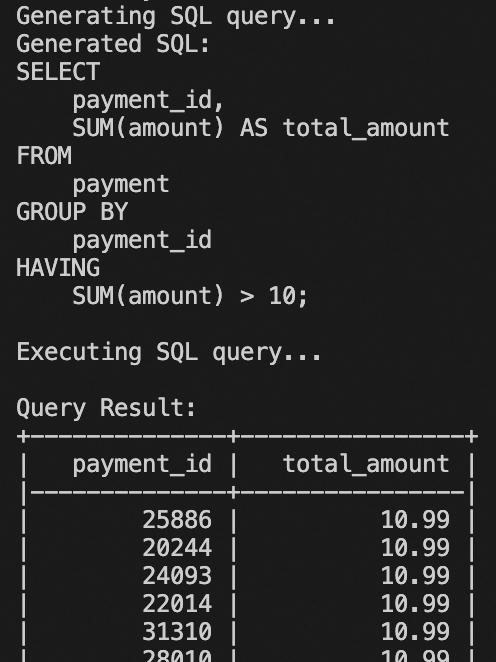
The results should resemble the figure above. Moreover, this code can be further developed and modified to create dashboards, and it will be integrated with ChatBI. Not as advanced as QuickBI’s ChatBI, however, it’s a good start.
This chatbot is just the beginning. With Alibaba Cloud’s Qwen series, you can expand into:
Ready to cut costs and boost productivity? Start with this text-to-SQL chatbot — and unlock the full potential of AI-powered automation.